What's New
Check out Tabit's exciting new features!
Don't miss out on these innovative tools and improvements
Tabit PAD
- View and manage third-party deliveries from the PAD
- Slide to confirm Quick Cash payments
1 View and manage third-party deliveries from the PAD
You can now see key delivery details for third-party delivery orders right on Tabit PAD, including the latest ETA and delivery information, so you can stay on top of every delivery without jumping between systems.
- View the order’s ETA and delivery details in a dedicated Third-Party Management view
- Track delivery status when using the DoorDash Drive integration
- Cancel deliveries when supported by your delivery provider integration
Please note: Delivery tracking and cancellation options depend on the external delivery provider and your integration setup
2 Update the cardholder name after pre-authorization
When a pre-auth is taken, the name returned by the payment processor is often generic or incorrect. You can now edit the cardholder name directly on Tabit PAD after the pre-auth, helping your team identify payments more easily throughout the order flow.
Tabit Office
- View orders across all sites from the HQ level
- Offer Codes now appear on PAD View
- Find information about your customers quicker than ever before
1 View orders across all sites from the HQ level
HQ users can now view orders and transaction data from all sites under their HQ, no need to be added as a user to each individual site.
This allows HQ teams to easily review order details, bills, and transaction logs across their entire hierarchy.
With improved visibility and no additional user management required, HQ users can resolve customer inquiries faster and operate more efficiently.
From the HQ site in Tabit Office, go to Back Office > Order Search. Use the Site dropdown to view all sites under the HQ and their related orders
2 Offer Codes now appear on PAD View
The Offer Code has now been added to PAD View and appears directly next to the item name, making it easier to see which offers are used where
3 Find information about your customers quicker than ever before
The Customer Info page in Back Office has been upgraded to make finding and managing customers faster and easier than ever.
When searching by name or phone number, results now appear after just three characters, helping quickly locate the right customer. All customer information, including details, addresses, tags, notes, guest notes, and full order history across all order types, is now available in one clear, centralized view.
Tagging and notes have also been enhanced, with Customer, Site, and HQ tags and notes (where applicable) all accessible from the same page, making it easier to capture insights and personalize service.
Tabit Shift
- Assign shifts by area, not just job function
- Offer Codes now appear on PAD View
1 Assign shifts by area, not just job function
Areas are now available in Tabit Shift, making it easier to reflect how teams actually work across different spaces in the restaurant, without creating extra job functions.
Areas let the same job function be associated with different locations or stations, such as bartenders working inside versus on the patio, or kitchen staff assigned to specific stations like grill, expo, or salad. This gives clearer context in scheduling while keeping job functions simple.
Areas appear directly when assigning employees to shifts
and on the daily roster card
Learn more about setting up Areas and using them in Tabit Shift
2 Improvements to the Roster Card
Improvements have been made to the Roster Card in both the Tabit Shift app and on desktop
On desktop:
- Any open shifts now appear without an employee assigned
- To save room for large reports, the time now reports as 9:00a-3:00p instead of using am and pm
- Print view has been optimized
In the app:
- Select the three dots in the top right corner and then tap Roster day report
-
Select Filters and then Show open shifts
Tabit Order
- Modernized ordering experience in Tabit Order
- Sub-modifiers now supported in Tabit Order
1 Modernized ordering experience in Tabit Order
The ordering experience has been refreshed with a clean, modern design, making it easier and more enjoyable for guests to browse, order, and check out.
- A redesigned menu layout with improved spacing and consistent item images for a cleaner look
- Enhanced item cards that clearly display item descriptions and key details
- A simplified category navigation bar fixed to the top for easier browsing
- Updated search design for quicker item discovery
- Clear preparation time and location indicators, now more visible and easier to understand
- Refreshed menu messages with improved styling and consistency
- A modern, responsive cart design that aligns with the updated menu
- Flexible cart display options, including a collapsible cart for a cleaner screen
- Clearer item details, summaries, and empty cart states
- Improved visibility for loyalty rewards and promotions
- Helpful progress indicators for minimum order requirements and free delivery
- Smoother transitions and a more consistent checkout experience across desktop and mobile
This update delivers a faster, clearer, and more polished ordering journey from start to finish.
Desktop
Mobile
2 Sub-modifiers now supported in Tabit Order
Sub-modifiers, previously released on PAD only, are now available in Tabit Order.
Sub-modifiers (also called “modifiers on modifiers”) let you add another layer of choice to your menu. Instead of stopping at a burger with a side, you can let guests choose which side (fries, salad etc.), add-ons for the side itself (toppings for the fries), and even how those toppings are prepared (melted cheese, extra crispy bacon, etc.). That extra step lives under the regular modifier and gives you much deeper control over how items are built, priced, and displayed.
With sub-modifiers, you can create up to four levels of customization:
Item → Modifier → Sub-modifier → Decision
For example: Burger (item) → Fries on the side (modifier) → Bacon as a topping for the fries (sub-modifier) → Regular or extra crispy bacon (decision for the sub-modifier)
Learn more about setting up and using sub-modifiers
Tabit Kitchen
Group items by seat instead of by ticket
Items that are commonly ordered in multiples, such as tacos, can now be grouped in a way that better reflects how they should be prepared and plated.
Previously, when multiple quantities of the same item were ordered, they appeared as a single aggregated line on the ticket, even across different seats.
Now, items ordered in multiples can be displayed separately, helping kitchen teams plate them correctly and deliver a smoother service experience.
Where to find it:
- In Tabit Kitchen, go to Setup > Profiles
-
Select Group same item by seat
Tabit Loyalty
Loyalty BI is here!
Introducing our new Loyalty BI dashboard, designed to give clear, tangible insights into Loyalty program performance. Use it to better understand guest behavior, track engagement, and make smarter, data-driven decisions.
Please contact your Tabit representative to enable Loyalty BI
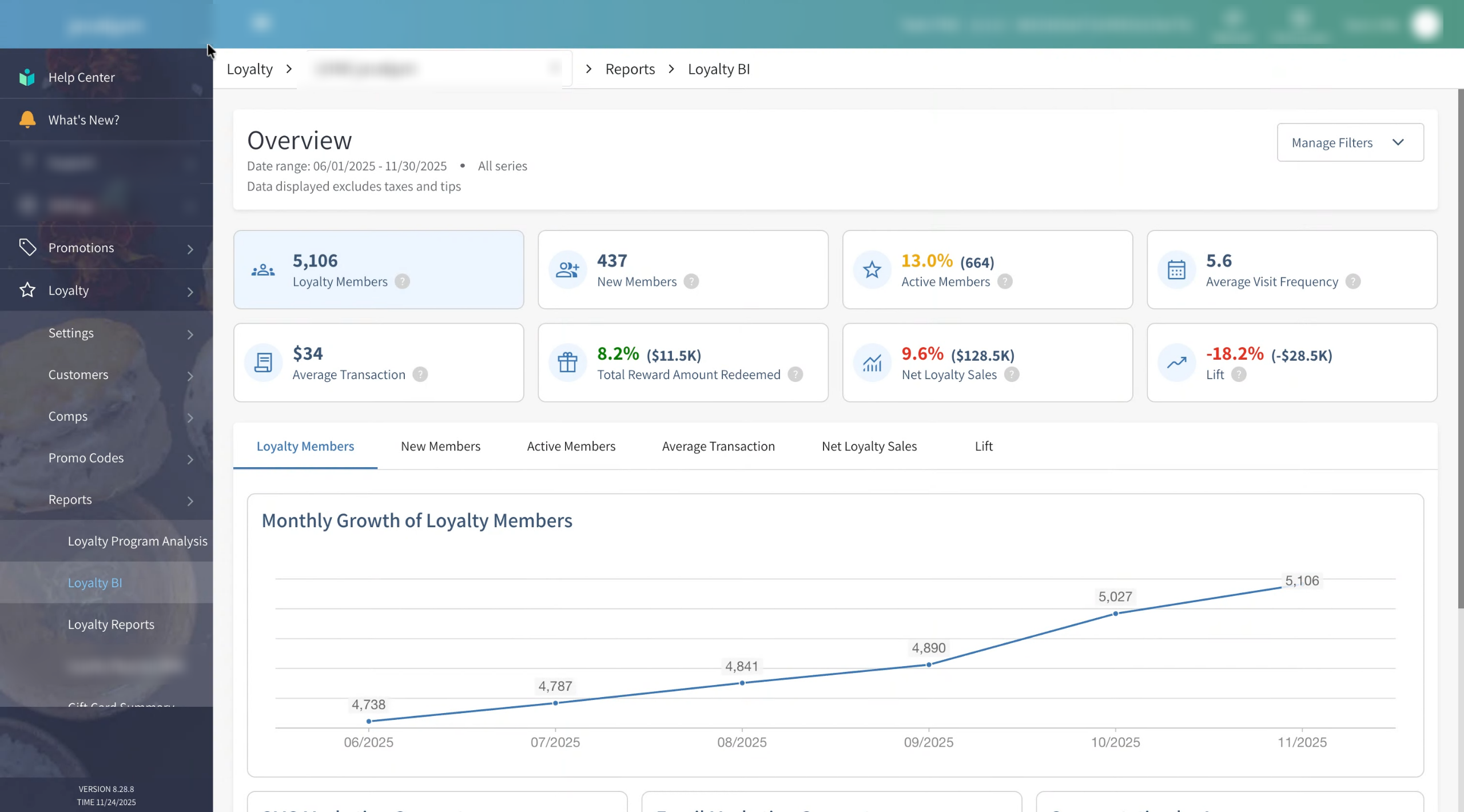
Break data down with easy to read metrics and in-depth insights
And build a data-driven business plan