The Delivery & TA Report provides a detailed view of delivery and takeaway orders within a selected date and time range. Use the report to review customer and order information, identify the source and type of each order, check payment details, and view the total sales amount.
Follow the steps below to view the Delivery & TA Report:
- In Tabit Office, go to Reports > Delivery & TA
- Use the filters at the top of the screen to narrow down the results:
- From: Select the starting date and time
-
To: Select the ending date and time
The search is based on the order closing time
- Order Type: Filter the report by order type
- Name / Phone: Search for an order using the customer's name or phone number
-
Select Apply to display the results
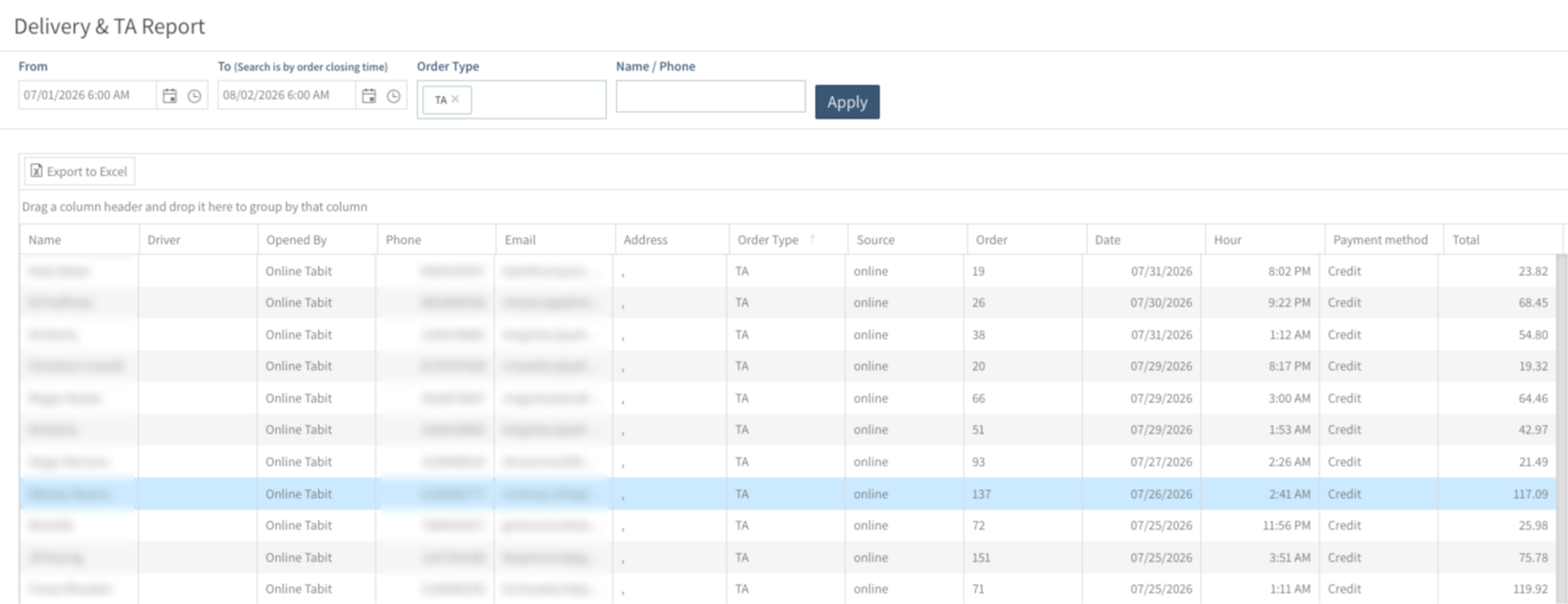
- The report displays the following information for each order:
- Name: Customer name
- Driver: Driver assigned to the delivery orders
- Opened By: User name or source that opened the order
- Phone: Customer phone number
- Email: Customer email address
- Address: Delivery address
- Order Type: The order type, such as Delivery, TA, or OTC
- Source: Where the order originated from
- Order: Order number
- Date: Order closing date
- Hour: Order closing time
- Payment Type: Payment method used for the order
- Total: Total order amount
- At the bottom of the table, Total displays the combined monetary value of all orders shown according to the selected filters
- To organize the results by a specific field, drag a column header to the grouping area above the table
- Select Export to Excel at the top of the chart to download the report results as an Excel file